A remote interpreter can help a patient understand care, yet an unsecured session may expose sensitive information. The question “how to ensure HIPAA compliance remote interpretation” is therefore about more than choosing a vendor or platform. It calls for a documented workflow that protects patient information before, during, and after each session.
Healthcare teams are right to ask whether an interpreter or language-service vendor needs a business associate agreement (BAA), and whether a phone or video setup could expose electronic protected health information. The answer depends on how the service handles that information, so don’t assume a vendor label alone establishes compliance. Your organization remains responsible for its own HIPAA obligations.
This guide offers a practical way to assess vendors, contracts, and technology, then turn privacy and security responsibilities into repeatable staff procedures. You’ll find pre-session and during-session checks, guidance for controlling access and protecting session privacy, and steps for documenting and responding to incidents. The goal is a clear, accountable process your team can apply consistently.
Key Takeaways
- Learn how to ensure HIPAA compliance remote interpretation by building safeguards into each stage of the session, not relying on a vendor’s general assurances.
- Assess vendors with specific questions about contracts, access controls, data transmission, retention, and incident response, and request written answers.
- Use a consistent preparation, live-session, and wrap-up process, sharing only the information needed for the interpreted encounter.
- Choose phone or video based on the clinical context, accessibility needs, and risks of the specific workflow rather than applying one format universally.
- Assign owners, train staff, and schedule reviews so approved workflows, exceptions, and corrective actions remain documented.
What HIPAA compliance means when you use remote interpretation
Remote interpretation must support accurate communication during care while protecting the health information involved. HIPAA compliance isn’t a label a vendor can confer on a session. It depends on how your organization and its service providers handle information, control access, and follow applicable privacy and security requirements. The Health Insurance Portability and Accountability Act (HIPAA) includes rules addressing the privacy and security of health information, but applying them to a particular workflow requires looking at what information is used and who handles it.
For how to ensure HIPAA compliance remote interpretation, start by mapping the people, technology, and information involved. HHS Office for Civil Rights guidance explains how business-associate relationships may apply when a service provider handles protected health information for a covered entity. Review current HHS guidance and consult your organization’s privacy or compliance lead; this overview isn’t legal advice.
When remote interpretation may involve protected health information
Imagine a clinician discussing a patient’s symptoms and medication instructions through a video interpreter. The patient’s spoken details are protected health information (PHI); if those details are created, received, maintained, or transmitted electronically, they may be electronic PHI (ePHI). A name visible on-screen, a chat message, or an electronic session record can also expose identifying health information.
In a remote interpreted encounter, ePHI is identifiable health information handled through electronic systems, including information spoken over an internet-based call, shown on-screen, messaged, or recorded in a session record. The distinction matters: spoken information can be PHI, while ePHI concerns electronic handling. Don’t assume that choosing audio rather than video removes privacy obligations.
Who is responsible for protecting information during a session?
The healthcare organization remains responsible for its workforce and care processes, including selecting approved workflows, training staff, and managing access to patient information. A remote language-service provider may be a business associate if it handles PHI on the organization’s behalf, but the specific relationship and service must be assessed. Check the provider’s role and whether a business associate agreement (BAA) is required for that engagement; don’t assume one applies to every arrangement.
HHS guidance on business associates helps organizations assess these relationships. A BAA can set out responsibilities and protections, but it doesn’t replace appropriate safeguards in practice. Before a session, confirm that staff use an approved channel, share only information needed for the encounter, and know whom to contact if a privacy or security concern arises. Vendor assurances are a starting point for review, not a substitute for documented organizational decisions.
How to assess HIPAA safeguards before choosing a remote interpreter service
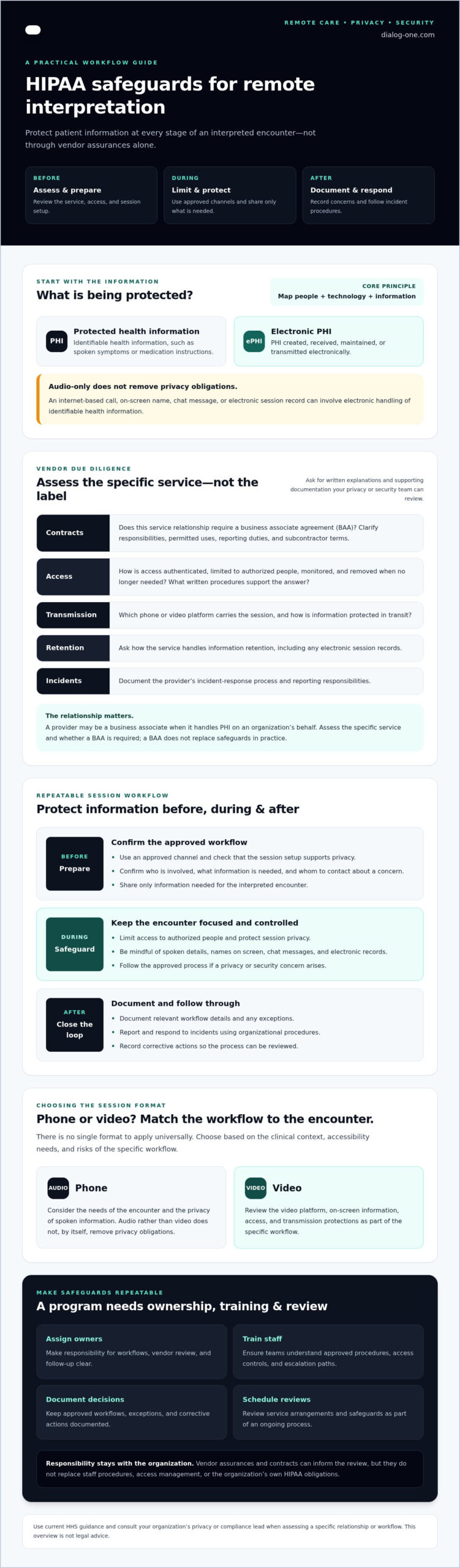
Evaluate the specific service and workflow, not a broad claim that a vendor is “HIPAA compliant.” Map how patient information moves through the phone or video session, including the platform and any subcontractors that may handle it. Ask for written explanations and supporting documentation your privacy or security team can review. HHS guidance on telehealth is a useful reference when assessing the technology and practices involved.
What to confirm in a business associate agreement
First, determine with counsel or your compliance lead whether the provider acts as a business associate for the particular service. If a BAA is applicable, review its permitted uses and disclosures, required safeguards, incident and breach reporting process, and provisions for relevant subcontractors. Confirm that both parties’ responsibilities and escalation contacts are clear before staff begin sessions. A signed agreement supports accountability; it doesn’t replace sound organizational practices.
Which technical and operational safeguards should you ask about?
Request answers specific to the selected phone or video workflow, not generic policy statements. Ask how access is authenticated, restricted, monitored, and removed; what encryption protections apply; whether sessions are recorded; and how session data is retained or deleted. Also request the provider’s incident-response procedures and information about workforce privacy and security training. Note gaps, follow-up questions, and decisions in your vendor review.
Use the same criteria for every candidate, including Dialog One’s phone and video interpreting services. Ask which safeguards and contract terms apply to the engagement, then document your organization’s assessment. That evidence-based process is a practical step in how to ensure HIPAA compliance remote interpretation without treating a vendor label as a substitute for due diligence.
How to protect ePHI before, during, and after an interpreted session
Turn privacy expectations into a routine staff can follow, from preparing the connection to closing it and raising concerns. Your organization’s approved policies define required procedures. The checklist below offers practical examples to adapt, not a substitute for those policies or a complete statement of legal requirements.
Apply the minimum-necessary standard where it applies, consistent with current rules and organizational guidance. Share the context the interpreter needs to support the encounter, but don’t disclose unrelated patient information. This principle shouldn’t be used to withhold information needed for treatment.
Before connecting the patient and interpreter
Prepare the setting and confirm the session is authorized. Keep patient names and clinical details out of public or shared spaces, and verify who is joining without announcing sensitive details where others can hear.
- Use approved tools: Connect through organization-approved devices, platforms, and access methods. Don’t switch to a personal account or unapproved app for convenience.
- Check privacy: Choose a private room, position screens away from passersby, and reduce the chance that conversations or notifications can be overheard or seen.
- Limit disclosure: Provide relevant encounter context through approved channels. Share only what’s needed for the interpreter to perform their role, as permitted by applicable rules and policy.
During and after the remote interpretation session
Stay attentive to the room and the connection. A video encounter can expose faces, screens, and background activity; a phone session can still be overheard or routed through a system that handles information electronically. Neither format is automatically compliant. Use the approved workflow for the specific service and encounter.
- During: Keep audio and video private, prevent unauthorized people from viewing screens, and avoid displaying unrelated records. Follow policy for chat, screen sharing, and any recording.
- At wrap-up: End the connection, close session windows, and secure the device. Document the encounter only in approved systems and according to organizational rules.
- If something goes wrong: Report a suspected disclosure, mistaken participant, or unsecured session promptly through the established incident process. Preserve relevant details as policy directs, and don’t investigate or promise an outcome independently.
Make the checklist easy to use at the point of care. A concise prompt can ask staff to confirm the approved platform, private setting, appropriate participants, necessary information, authorized documentation, and incident-reporting route. Adapt it to your organization’s risk assessment and procedures. That repeatable process is a practical part of how to ensure HIPAA compliance remote interpretation, while preserving the clear communication patients need. For healthcare teams supporting patients with limited English proficiency, understanding how to arrange LEP patient interpreter services across phone, video, and in-person formats can help match language support to clinical context and timing.
How to compare phone and video interpretation workflows for privacy
Choose the channel that fits the encounter, the patient’s communication needs, and your organization’s risk assessment. Phone interpretation can limit visual exposure, but audio may not convey visual cues. Video can support face-to-face communication, yet it introduces camera, screen, and room-privacy considerations. Neither format is automatically HIPAA compliant. Assess the actual platform, access controls, and session practices for each workflow.
When phone interpretation may fit the encounter
Audio may be suitable when visual cues aren’t needed and a private location is available. It can also reduce visual disclosure, since the interpreter doesn’t see the patient or the care setting. That doesn’t remove the need for safeguards: confirm participants, use the approved connection method, protect the conversation from being overheard, and follow the same documentation and incident procedures used for other channels.
When video interpretation may support the care team
Video may be useful when seeing a speaker or visual context supports communication. Before connecting, check that the camera shows only what’s necessary, the screen doesn’t reveal unrelated records, and other people aren’t visible or audible without authorization. Review platform access settings and prepare a private room. For broader planning, pair the encounter-level decision with your organization’s healthcare language-access guidance.
Document why the format fits the encounter and what safeguards apply. For an overview of the service format, read a guide to on-demand video remote interpreting as part of your evaluation. To explore phone and video interpreting options, review Dialog One’s interpreting services. The practical answer to how to ensure HIPAA compliance remote interpretation is a workflow matched to the encounter, not a blanket preference for phone or video.
Build a repeatable HIPAA compliance program for remote interpretation
Make remote interpretation part of your organization’s broader privacy and security program, with clear accountability rather than informal workarounds. Assign named owners for privacy, security, clinical operations, vendor management, and incident escalation. One person may hold more than one role, but staff should know who approves workflows, answers questions, and receives reports.
Create an auditable workflow and train staff
Write procedures for requesting and connecting with an interpreter, using approved systems, documenting sessions, and escalating concerns. Train staff to share only the information needed through authorized channels, not to place patient identifiers in unsecured messages or informal requests. Keep records of procedure versions, training completion, workflow approvals, exceptions, and corrective actions.
Documented procedures, role-based training, and active oversight turn privacy expectations into repeatable risk management. That record also helps leaders identify where staff need clearer guidance or where practice has drifted from the approved process.
Review vendors and improve the process over time
Set a recurring review schedule and trigger an additional review when a contract, platform, workflow, or applicable guidance changes. Include the people responsible for vendor management, privacy, security, and care operations. Examine whether approved practices are still being followed, whether staff have raised concerns, and whether prior findings were resolved.
- Review the record: Revisit vendor decisions, contract terms, approved service workflows, exceptions, reported incidents, and corrective actions.
- Close open questions: Track unresolved vendor questions about safeguards or service changes, assign an owner, and document the decision before relying on the affected workflow.
- Learn from experience: Consider staff feedback and incident trends when updating procedures or training. Preserve a record of what changed and why.
This is a practical foundation for how to ensure HIPAA compliance remote interpretation: clear ownership, documented decisions, and regular review. It also keeps the organization responsible for its own safeguards, regardless of which interpreting provider it selects.
Dialog One provides on-demand phone and video interpreting in more than 200 languages, with 24/7 on-demand availability. If you’re evaluating a provider, ask how the specific service and workflow fit your organization’s requirements, which safeguards apply, and whether a BAA is available for the engagement if needed. Explore Dialog One’s phone and video interpreting services as one option to assess through your documented review process.
Make remote interpretation privacy part of routine care
Reliable remote interpretation depends on a repeatable process, not a vendor label. Assess each service’s contract, technology, and safeguards; prepare staff to protect patient information throughout the session; and document who owns decisions, incidents, and ongoing reviews.
To understand how to ensure HIPAA compliance remote interpretation, keep your organization accountable for its own practices while evaluating each provider against your specific requirements. Confirm how the selected phone or video workflow handles information, and resolve questions about contract terms and safeguards before use. Then revisit those decisions when services or workflows change.
Dialog One brings more than 25 years of language-services experience and provides on-demand phone and video interpreting in more than 200 languages, with 24/7 on-demand availability. Evaluate the specific service, applicable safeguards, and contract terms for your engagement. Explore Dialog One’s phone and video interpretation services as part of your assessment.
With clear procedures and thoughtful provider review, your team can support meaningful communication while treating patient privacy as a responsibility at every step.
Frequently Asked Questions
Is remote interpretation HIPAA compliant?
Remote interpretation can be part of a HIPAA-compliant workflow, but a vendor label or platform setting alone doesn’t establish compliance. Assess the service relationship, determine whether a business associate agreement (BAA) applies, review safeguards, and set workforce procedures for the specific session. To understand how to ensure HIPAA compliance remote interpretation, map how information is handled and confirm current requirements with your organization’s privacy or legal team.
Does a remote interpreter need to sign a BAA?
It depends on the parties’ roles and the specific service arrangement. A BAA may apply if a provider creates, receives, maintains, or transmits electronic protected health information on behalf of a covered entity or business associate. Don’t assume every interpreter relationship requires one, or that none do. Ask your privacy officer or counsel to assess the arrangement, then document applicable contract terms and responsibilities before service begins.
Can interpreters access patient records during a remote session?
Access should be limited to what’s appropriate for the interpreter’s role and the encounter. First determine whether records are needed at all. If access is appropriate, use organization-approved methods and limit the information shared to what’s needed, consistent with applicable requirements and policy. Check internal procedures and the provider’s practices rather than assuming every session requires record access. Clear boundaries help protect patient information without disrupting communication.
How can a healthcare organization secure a video interpretation session?
Use approved platforms and devices, restrict access to authorized participants, and conduct the session in a private room. Position the camera to show only what’s needed, check for visible screens or background participants, and follow organizational rules for chat, recording, and session closure. Ask the provider how authentication, transmission, retention, and incident response work. These steps support a broader compliance program; no single setting or feature guarantees HIPAA compliance.
Should remote interpretation sessions be recorded?
Recording isn’t automatically necessary or automatically prohibited. Before recording, define the purpose, confirm authorization under applicable law and policy, and establish who can access the recording, how it will be protected, and how long it will be retained. Ask the provider whether recording is enabled by default and how it can be managed. Consult your privacy officer before recording or retaining a session that contains patient information.
What should a healthcare organization do if ePHI is exposed during interpretation?
Staff should promptly follow the organization’s incident-response process and notify designated privacy or security contacts. Preserve relevant details as instructed, but don’t circulate sensitive information more widely than necessary. Qualified personnel should assess what happened, what information may have been exposed, and what follow-up is required under applicable rules. Avoid assuming a reporting deadline or making promises before the facts and current requirements have been reviewed.
Is phone interpretation safer than video interpretation for HIPAA?
Neither format is automatically safer or compliant in every situation. Phone may reduce visual exposure, while video adds camera, screen, and room-privacy considerations. The organization should compare the encounter’s communication needs, privacy setting, access controls, vendor safeguards, and the actual workflow. Choose the channel that supports the patient’s needs within documented organizational controls, then apply appropriate privacy, security, and incident procedures consistently.