What if adding captions doesn’t make a virtual meeting understandable to everyone? The right language support depends on what participants need to follow and how much accuracy the conversation demands. When planning multilingual captioning virtual meetings, distinguish live captions from transcripts and translated captions, which display speech in another language.
It’s reasonable to want a simple, automatic solution. But specialized terms, unclear audio, and speaker intent can affect how well automated tools capture meaning. A routine team update may call for a different approach than a meeting where decisions depend on precise communication.
This guide explains how multilingual captioning approaches work, where they can help, and how to prepare your meeting for clearer communication. You’ll learn how to match the format to participants and the stakes, set expectations, and run practical quality checks. When captions alone aren’t the right fit, professional interpreting can support spoken communication. The goal is an informed choice, not more technology for its own sake.
Key Takeaways
- Multilingual captioning virtual meetings can mean captions in the speaker’s language or translated text. Identify the access need before selecting a workflow.
- Speech recognition creates text; translation converts that text into another language. Knowing the difference helps you assess what a meeting tool provides.
- Match same-language captions, translated text, or interpreter-supported communication to participants’ language needs, interaction level, and the stakes of the discussion.
- Prepare names, acronyms, and specialist terms in advance, then test the setup and review caption quality during the meeting.
- Dialog One provides AI live transcription and captioning with optional human oversight, alongside interpreting for communication needs where spoken language support is important.
What Does Multilingual Captioning for Virtual Meetings Actually Mean?
Multilingual captions are on-screen text synchronized with meeting speech, shown either in the spoken language or translated into another language. They help participants follow what’s being said without relying on audio alone. In multilingual captioning virtual meetings, “multilingual” can refer to captions in the speaker’s language, translated captions for participants, or a meeting where different people use different caption languages. These are distinct needs, not interchangeable features.
Captions generally appear as speech happens, in short segments participants can read while watching the meeting. A transcript, by contrast, is a written record of what was said. It may be prepared during or after a meeting, but it isn’t necessarily synchronized with the conversation or available as people speak. The Closed Captioning on Wikipedia overview offers additional context on how captions present spoken content as text.
How Are Multilingual Captions Different from Transcripts?
Live captions follow the meeting’s pace: text appears in sequence, often in brief, readable phrases, and may indicate speaker changes. Timing helps participants connect the words on screen with the person speaking and the moment being discussed. A transcript preserves the conversation as text, but a document viewed later can’t provide the same real-time support to someone trying to participate in the live discussion.
For example, a participant who can hear only parts of a call may use synchronized captions to follow a question as it’s asked. A transcript might help them review the question afterward, but it won’t necessarily help them respond at the right point in the conversation. Captions and transcripts can complement each other, but they serve different purposes.
What Does “Multilingual” Mean in a Virtual Meeting?
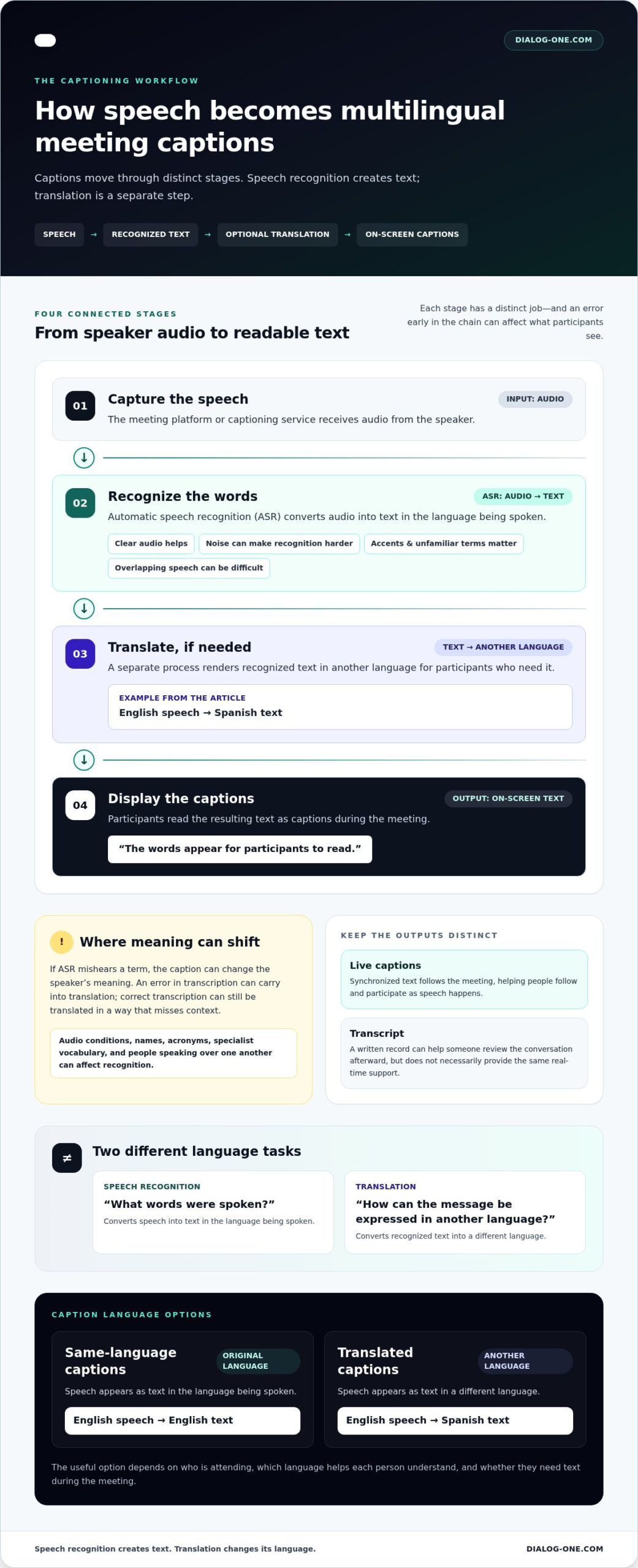
There are two main forms. Same-language captions show speech in its original language, such as English speech displayed as English text. Translated captions render that speech in another language, such as English speech displayed as Spanish text. The first supports people who benefit from reading the language being spoken; the second can help participants who need text in a different language.
The useful option depends on who is attending and which language helps each person understand the discussion. If participants share a spoken language but prefer to read, same-language captions may meet the need. If they follow the meeting in different languages, translated text may be more relevant. A meeting may involve both needs.
Don’t assume a platform’s captioning and translation capabilities are the same, or that every workflow supports the same languages. Clarify whether participants need text in the original speech language or another language, and whether they need it during the meeting. That distinction gives organizers a precise starting point for selecting an access approach.
How Can Spoken Language Become Multilingual Meeting Captions?
Turning speech into multilingual captions usually involves separate tasks. First, a system captures the speaker’s audio. Speech recognition converts the spoken words into text. If participants need another language, a translation step renders that text in the target language before captions appear on screen. Some workflows display only same-language text; others add translation. Each step can affect what participants see and understand.
- Capture speech: The meeting platform or captioning service receives audio from the speaker.
- Recognize words: Automated speech recognition (ASR) converts the audio into text in the spoken language.
- Translate if needed: A separate process converts the recognized text into another language.
- Display captions: The resulting text appears for participants to read.
These stages aren’t interchangeable. ASR answers, “What words were spoken?” Translation answers, “How can that message be expressed in another language?” An error in the first stage can carry into translation, while a correct transcription can still be translated in a way that misses context. Understanding this chain helps organizers identify where a workflow may need preparation or review. For wider context on evolving transcription tools, see this guide to AI live transcription services.
What Role Does Automatic Speech Recognition Play?
ASR analyzes incoming audio and generates text in the language being spoken. Clear audio helps, but background noise, accents, unfamiliar names, specialist vocabulary, and people speaking over one another can make recognition harder. If ASR mishears a term, the caption can change the speaker’s meaning. Recognizing speech doesn’t translate it: converting spoken English into written English and rendering that text in another language are distinct tasks.
When Might Human Language Expertise Matter?
Human expertise may be valuable when meaning depends on context, technical terms, or a speaker’s intent. A phrase that sounds straightforward in isolation can carry a different meaning in a legal, medical, or organizational discussion. A human professional can bring language and subject-context judgment to communication. Review adds a quality layer, not a promise that every caption will be perfect.
Automation can provide speed; contextual accuracy may call for human judgment. Consider the consequences of a misunderstanding, not only how quickly text appears. A routine internal update and a discussion involving consequential decisions may call for different levels of oversight. Where participants need spoken-language support rather than on-screen text, professional interpreting is a distinct option. Dialog One provides AI live transcription and captioning with optional human oversight. AI live transcription and captioning can be part of a broader plan for clearer meeting communication.
Which Multilingual Captioning Approach Fits Your Virtual Meeting?
Choose a format based on what participants need to understand and how they need to take part. Same-language captions can make speech easier to follow, while translated text can bridge a language difference on screen. Interpreter-supported communication offers another path when people need to listen, speak, and respond in a language they understand. Use this comparison to match multilingual captioning virtual meetings to the discussion rather than relying on one format for every situation.
| Approach | Audience language needs | Interaction and terminology | Stakes to consider |
|---|---|---|---|
| Same-language captions | Participants can follow the spoken language but benefit from reading it. | Can support routine discussion; names and technical terms may need attention. | Often a practical text aid for lower-stakes meetings, though automated captions can mishear speech. |
| Translated captions | Participants need on-screen text in a language different from the speech. | Useful for following discussion across languages; translation may affect specialized wording or nuance. | Consider the consequences of errors and whether human review is appropriate. |
| Interpreter-supported communication | Participants need spoken communication in another language. | Can support live exchange, including questions and responses, with professional language expertise. | Consider for sensitive, specialized, or consequential discussions where context matters. |
Captions can improve access, but they don’t automatically replace an interpreter. Text and spoken interpreting serve different participation needs. A person reading translated captions may follow the conversation, while an interpreter can support spoken communication between participants. The appropriate format depends on the meeting’s purpose, participant preferences, and the cost of misunderstanding.
When Are Automated Captions a Practical Starting Point?
For a routine team update or general presentation, automated captions may offer a useful text aid. Before choosing them, consider participants’ preferred languages, how quickly people will need to respond, and whether the meeting relies on technical vocabulary. A fast-paced discussion with acronyms or unfamiliar names may need extra preparation or review. Automated captions can help, but they aren’t error-free or suitable for every participant.
When Should Organizers Consider Professional Language Support?
Plan carefully for sensitive, specialized, or consequential conversations. In healthcare, education, or legal settings, participants may need more than translated text to ask questions, clarify meaning, or respond in real time. Translated captions present written language on screen; interpreting supports spoken exchange. Weigh the interaction required and the potential impact of a misunderstanding when selecting the workflow.
When spoken language support is important, Dialog One provides on-demand phone and video interpreting, as well as scheduled interpreting. Explore Dialog One language services to consider interpreting alongside AI live transcription and captioning with optional human oversight.
How Do You Prepare and Check Multilingual Captions for a Virtual Meeting?
Clear captions start before anyone joins the call. Use a short preparation sequence to align the language workflow with participant needs, reduce avoidable terminology errors, and assign someone to check that captions remain usable. For multilingual captioning virtual meetings, preparation matters because captions can appear on time yet still be difficult to read, poorly attributed, or confusing.
- Identify language and access needs. Ask participants respectfully which spoken or caption languages and access formats will help them take part. Explain the purpose of the request and avoid asking people to share more than they’re comfortable with.
- Select the workflow. Decide whether the meeting needs same-language captions, translated text, or interpreter-supported communication. Consider the languages involved, the pace of discussion, and how participants will ask questions or respond.
- Prepare key terms. Gather speaker names, acronyms, organization names, and specialist vocabulary in advance when appropriate. An agenda or relevant meeting material can provide useful context for captioners or language professionals.
- Test the setup. Run a short check using the meeting’s actual audio and caption configuration. Confirm that text is readable, appears at a useful pace, and identifies speaker changes clearly.
- Review and learn. Assign someone to monitor the caption workflow and handle technical issues. After the session, record recurring problems so the team can improve future meetings.
For more on captioning fundamentals and practical considerations, consult this real-time captioning services guide.
What Should Organizers Share Before the Meeting?
Give language professionals the context they need to prepare: the agenda, presenter names, acronyms, and specialized terms likely to come up. Share only materials appropriate for the meeting and handle them through the agreed process. Then tell participants how to access captions or interpreting and who is overseeing the setup. Clear expectations make it easier to raise an issue without interrupting the discussion.
How Can Teams Evaluate Caption Quality During the Session?
During the test and meeting, check whether text arrives in time to follow, remains readable, and corresponds to the person speaking. Watch for delays, unclear speaker changes, or repeated errors in names and key terms. Invite participants to report access barriers through an agreed channel, but don’t make them responsible for identifying or correcting every caption error. Assign a host or support person to respond, note patterns, and follow up after the call.
Use those observations to refine the next meeting’s preparation, terminology list, or workflow. For support with AI live transcription and captioning, including optional human oversight, explore Dialog One’s captioning services.
How Can Dialog One Support Clearer Multilingual Communication?
Effective multilingual captioning virtual meetings starts with a clear plan, not a single tool. Identify participants’ language and access needs, choose a workflow that fits how they’ll take part, prepare important terminology, and review how well the setup works. The communication stakes matter too. A routine update may need a different level of language support than a meeting where participants must discuss sensitive details or make consequential decisions.
Dialog One provides AI live transcription and captioning, with optional human oversight. This supports captioning needs while keeping review in view when context or accuracy matters. Dialog One also provides on-demand phone and video interpreting 24/7 in over 200 languages for spoken-language communication needs.
- Define access needs: Consider the languages participants use and whether they need on-screen text, spoken-language support, or both.
- Choose the workflow: Match the format to the meeting’s pace, interaction, and communication stakes.
- Prepare terminology: Share relevant names, acronyms, and specialist terms in advance when appropriate.
- Review quality: Check captions during a test and meeting, and note issues to address next time.
With more than 25 years of language-services experience, Dialog One brings captioning and interpreting options into a broader conversation about clear communication. The right plan is specific to the meeting and its participants.
How Do Captioning and Interpreting Serve Different Needs?
Captioning presents spoken content as on-screen text. Interpreting supports spoken communication between people using different languages. A participant may benefit from captions while another needs to hear a conversation in a language they understand. Organizers can consider both formats when access needs vary, but neither automatically replaces the other. Select each based on how participants need to receive and contribute to the discussion.
What Should a Meeting Team Take Away?
Start with people, purpose, and stakes. Set realistic expectations for automated captioning, prepare the language workflow, and make time to check whether it’s working. Human oversight may add contextual judgment, especially when a misunderstanding could have meaningful consequences. Thoughtful preparation helps teams make informed choices without assuming one solution suits every meeting.
To plan language support for an upcoming meeting, explore Dialog One language services and consider which captioning or interpreting option best fits your communication needs.
Make Your Next Meeting Easier to Follow
Use your next meeting as an opportunity to make language access part of the planning process, not an afterthought. Decide who will coordinate access, how participants can share what they need, and how the team will learn from any issues. A brief review afterward can turn one meeting’s lessons into a clearer plan for the next.
For multilingual captioning virtual meetings, thoughtful preparation helps teams choose an approach that fits the people in the room and the purpose of the discussion. It also sets realistic expectations: technology can support communication, while human expertise can add valuable context when it matters.
Dialog One brings captioning and interpreting options together through more than 25 years of language-services experience. Explore Dialog One language services to plan language support for your meeting. With a considered plan, every participant has a better chance to follow the conversation and contribute with confidence.
Frequently Asked Questions
Can multilingual captions show the original speech and a translation at the same time?
Some setups may show both, but the display depends on the platform and captioning workflow. A meeting might provide one caption language for everyone, while another arrangement may offer additional text views. Don’t assume each attendee can choose a separate language. Before inviting participants, explain what they’ll see and ask them to flag access concerns so you can address them before the meeting starts.
How many languages can virtual-meeting captions support at once?
There’s no single number that applies to every platform or service. Options depend on the setup and whether it provides transcription, translation, or language-professional support. For multilingual captioning virtual meetings, identify the languages participants need, then communicate which caption languages the meeting will provide. Avoid promising simultaneous language views based on a platform’s general language list; the actual configuration determines what attendees can use.
Do attendees need to install software to view multilingual captions?
Not always. Some platforms show captions inside the meeting interface, while an external captioning service may use different access steps. Send instructions ahead of time that explain how to turn captions on and where they’ll appear. A brief test with attendees using different devices or access methods can reveal problems, such as unclear instructions or captions that are hard to locate, before the live discussion begins.
Can multilingual captions identify different speakers accurately?
Speaker labels may be available, but they can be less reliable if people speak at once or use poor-quality microphones. Ask participants to take turns and say their names before speaking when the meeting format allows. During a test, check whether labels match the active speaker. If labels are unclear, tell participants how the meeting will handle speaker changes rather than relying on captions alone to identify who said what.
What should I do if a participant needs a different language during the meeting?
Pause at a suitable point and ask respectfully what language support would help. Don’t assume the caption view can switch immediately or that the needed language is available in the current setup. If spoken exchange is essential, professional interpreting may be a better fit than on-screen text alone. For a scheduled meeting, use the participant’s request to revise the plan and communicate any changes to the group beforehand.
Are multilingual captions appropriate for confidential virtual meetings?
They may be appropriate, but organizers should understand how the meeting platform handles captions, recordings, and text retention before enabling them. Review your organization’s privacy procedures, limit access to meeting materials, and plan how sensitive information will be discussed. Captions alone don’t establish that a meeting meets privacy requirements. For a high-stakes session, coordinate the access workflow with the people responsible for technology and information handling.