Comprehensive Operational Guide

Getting Started

Welcome to Dialog One

The strategic management of language services requires professional oversight. This guide ensures you are ready to use Dialog One for high-fidelity interpretation and translation.

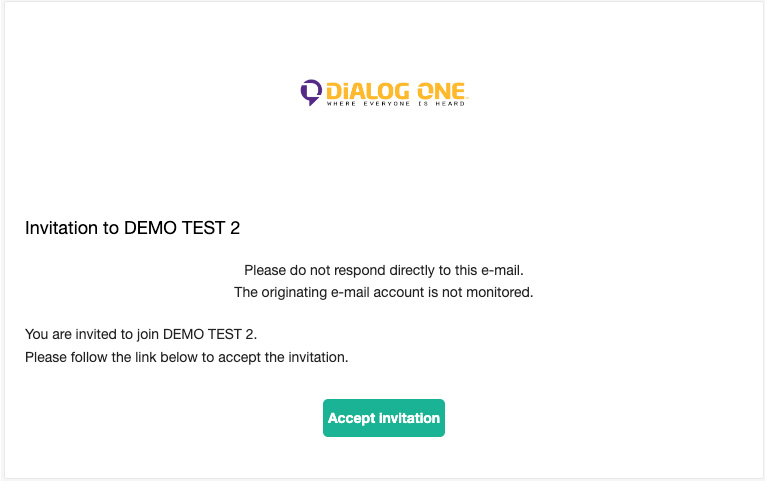
Accepting Your Account Invitation

Invitations are sent via email and expire in **24 hours**. Check your inbox for “Invitation to [Company Name]”.

  • Click Accept Invitation.
  • Create a password (8-50 chars, upper, lower, number, special).
  • Login using your email.

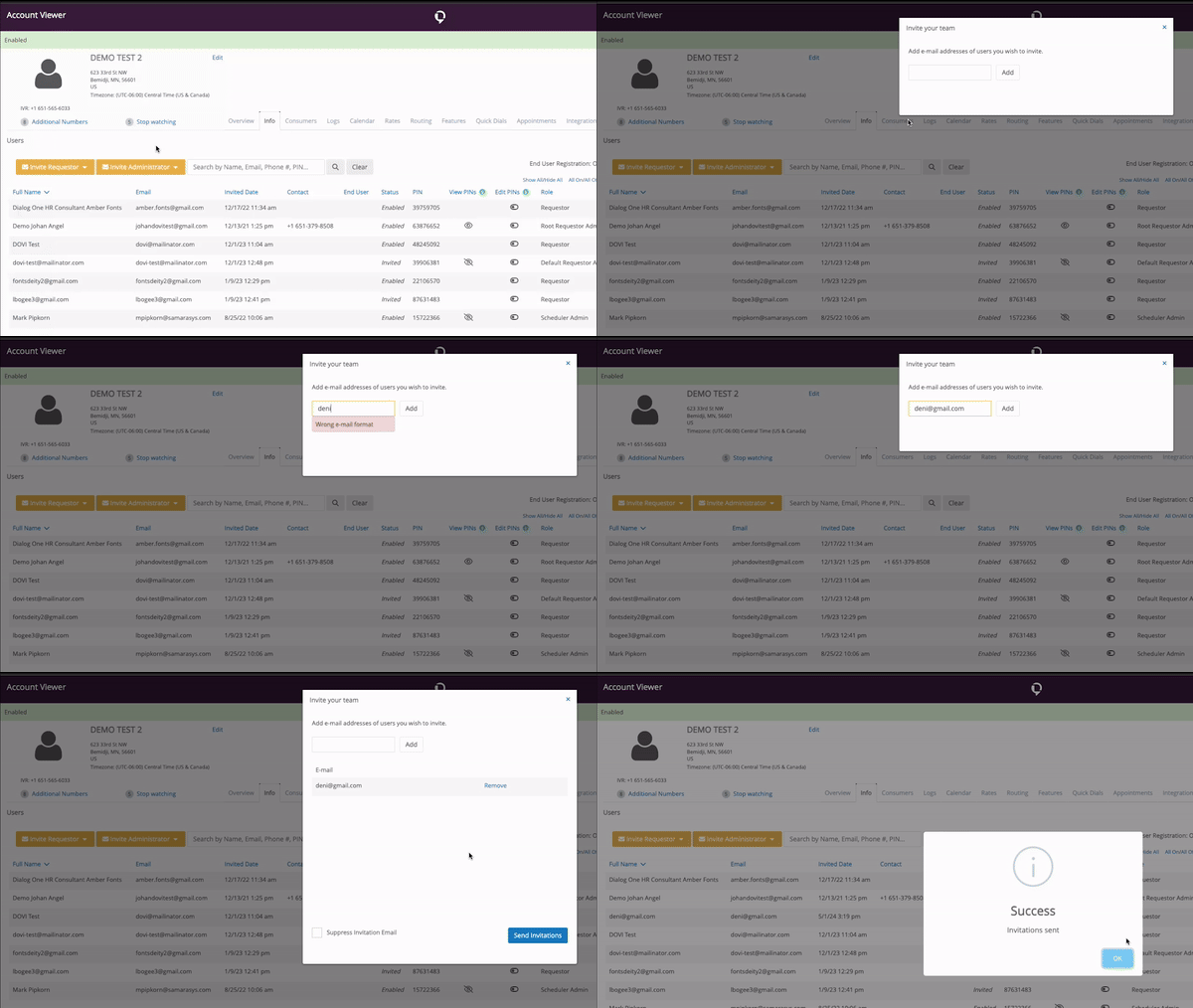
Inviting Your Team

Administrators can scale access via the Members tab:

  • Go to Members tab.
  • Click Invite Requestor.
  • Enter the email and click Add.
  • Click Send Invitations.
Zoom Integration

Zoom Integration Guide

Specific Protocol for Educators & Staff

On-Demand Phone (Audio)

Every teacher has access to phone interpreters via their school email account. This does not require a special login.

  • Access via the Dialog One contact in your email directory.

  • Dial the language needed (e.g., “Spanish Interpreter”).

  • Once connected, share your Zoom Link with the interpreter.

  • The interpreter joins the meeting via audio.

On-Demand Video (VRI)

Video interpretation is a high-privilege service with strict access requirements.

Mandatory Requirement

You MUST be logged into the Zoom account provided by your IT Department or School District to access Video On-Demand.

  • 1. Log in to the District Zoom Account.
  • 2. Launch Dialog One Integration.
  • 3. Select Video and target language.
On-Demand

Requesting On-Demand Interpreters

Web Browser

  1. Click Caller Icon in top menu.
  2. Choose OPI (Audio) or VRI (Video).
  3. Select Language & Service Type.
  4.  Tap Green Call button.

DOVI Mobile App

Search “DOVI” in App Store/Google Play

  1. 1. Select Oral Interpretation.
  2. 2. Select Call Type (Camera/Phone icon).
  3. 3. Select Language.
  4. 4. Tap Yellow Call button.

Landline / IVR

  1. 1. Dial (651) 565-6033.
  2. 2. Enter your unique P.I.N.
  3. 3. Press 0 to say language or enter 3 digits.
  4. 4. Brief the interpreter.

Identifying Languages (“I Speak” Card)

Use the “I Speak” Card to help clients identify their preferred language. If literacy is an issue, access the audio version on the Dialog One website.

Access I Speak Card Audio →

Scheduled Appts

Scheduled Interpreter Services

⚠️   Community Safety Advisory: On-Site Availability

Due to heightened enforcement activity by ICE in Minneapolis and throughout Minnesota, on-site interpreter availability is currently significantly limited.

To protect the safety of parents, students, and our dedicated interpreter community, we strongly recommend that schools transition scheduled sessions to Virtual Remote Interpretation (VRI).

By choosing virtual options, you ensure service continuity and provide a safe environment for all participants.

Scheduling Process

  1. Appointments Tab: Navigate to “Appointments” and click Create New Appointment.
  2. Details: Fill in Language, Combination, and Delivery (On-site, 3rd Party/Zoom, or Telephonic).
  3. Lead Time:
    • Standard: 1 week advance notice.
    • Exotic: 2-3 weeks advance notice.
    • ASL: 3 weeks mandatory notice.
  4. Save: Submit request to be matched with a specialized interpreter.

How to Join a Phone Session

Join up to 7 minutes before the start time via Browser.

  • Log into Profile (Chrome/Firefox).
  • Open Caller > Click Scheduled tab.
  • Click Join.

Cancellation Policy

Cancellations within 24 business hours are billable in full. To cancel:

  1. Go to Appointments.
  2. Click the three dots (…) on the appointment.
  3. Select Cancel and confirm fees.
Document Translation

Document Translation

Document translation handles complex, project-based requests including legal, medical, and technical content.

Click Place Translation Order on Dashboard

Upload Files (PDF, Word, etc.)

Select Language Pair

Provide Instructions (Scope of Work)

No “Translation” Button?

This service is limited to specific organization members. If you lack access but have an urgent request:

Email Customer Care  or contact your Account Manager.
Account NameLink to create an account
ISD 623 - Aŋpétu TéčaCreate Account
ISD 623 - Brimhall ElementaryCreate Account
ISD 623 - Central Park ElementaryCreate Account
ISD 623 - District CenterCreate Account
ISD 623 - E.D. Williams ElementaryCreate Account
ISD 623 - Early Childhood Special EducationCreate Account

ISD 623 - Edgerton Elementary
Create Account
ISD 623 - Fairview Alternative High SchoolCreate Account
ISD 623 - Falcon Heights ElementaryCreate Account

ISD 623 - Harambee Elementary
Create Account
ISD 623 - Little Canada ElementaryCreate Account
ISD 623 - Parkview Center SchoolCreate Account
ISD 623 - Roseville Area High SchoolCreate Account
ISD 623 - Roseville Area Middle SchoolCreate Account

Get Your Translation Quote Now

To provide you with the most accurate pricing, we’ll need a few details about your document. Please create a quick account to start your quote request!

Create Account & Get Quote