What happens when a live caption gets a speaker’s name, technical term, or critical statement wrong? For event organizers, that risk comes with practical questions about platforms, audio, and preparation. Real-time captioning services can make spoken content easier to follow, but choosing a workflow takes more than selecting the fastest option.
You need captions that are accessible and dependable without adding unnecessary complexity to event operations. The right approach depends on the subject matter, speaker setup, and consequences of a captioning error. AI can provide speed and scale; human oversight can help address context and accountability when they matter.
This guide explains how live captioning works, what to evaluate, and how to prepare speakers, audio, and event technology. You’ll learn when automated captions may suit an event and when a workflow with human oversight deserves consideration. Dialog One combines AI live transcription and captioning with optional human oversight, drawing on more than 25 years of language-services experience. Use the guidance here to choose an approach that supports audience access and clear communication.
Key Takeaways
- Choose real-time captioning services according to event complexity and the consequences of an error, not speed alone.
- Understand how speech recognition turns incoming audio into on-screen text, and how delays or unclear audio can affect the viewing experience.
- Compare automated captioning with workflows that add human oversight to find the right balance for your event.
- Prepare by reviewing the event format, audience needs, speaker count, and specialized terminology before the session begins.
- Explore how Dialog One’s AI live transcription and captioning with optional human oversight can fit your organization’s requirements.
What Are Real-Time Captioning Services, and When Do They Help?
Real-time captioning services convert live speech into synchronized on-screen text, so viewers or participants can follow what is being said as it happens. The words appear after a short processing delay, giving people another way to access spoken information during a meeting, presentation, or event.
In a typical workflow, a microphone captures a speaker’s voice, and speech recognition processes the audio into words. Captions then appear through an event platform, screen, or other configured display. The setup varies, but the purpose is the same: make spoken content easier to follow without requiring every attendee to hear each word clearly.
Captions can help when a speaker is difficult to hear, audio quality varies, or participants are joining from different environments. They may also help attendees follow unfamiliar names or technical language by letting them read along as they listen. Captioning can support access and comprehension, but it doesn’t automatically meet every audience’s needs.
How live captions support meetings and events
In a remote team meeting, captions can help someone keep up when a connection drops words or nearby noise makes listening difficult. At a public presentation, they give attendees a text channel alongside the speaker. In education, students may use captions to reinforce spoken explanations; professional teams may find them useful during detailed briefings or discussions.
Captions represent speech as text in the original language. A translated interpretation service, by contrast, conveys spoken meaning from one language into another, typically through spoken interpretation. These services address different communication needs, so one shouldn’t be treated as a substitute for the other.
Real-time captions, transcripts, and subtitles: what differs?
Captions are text synchronized with live or recorded spoken content and displayed while someone watches or participates. In a live meeting, the words appear as the speaker talks rather than only after the session ends.
Transcripts record speech as text, often for later review, reference, or documentation. A transcript may be created from a recording after an event, so it doesn’t necessarily help someone follow the conversation in the moment. Subtitles display dialogue alongside video and may reproduce the original speech or translate it into another language. Labels can vary by context, but timing and purpose help distinguish them.
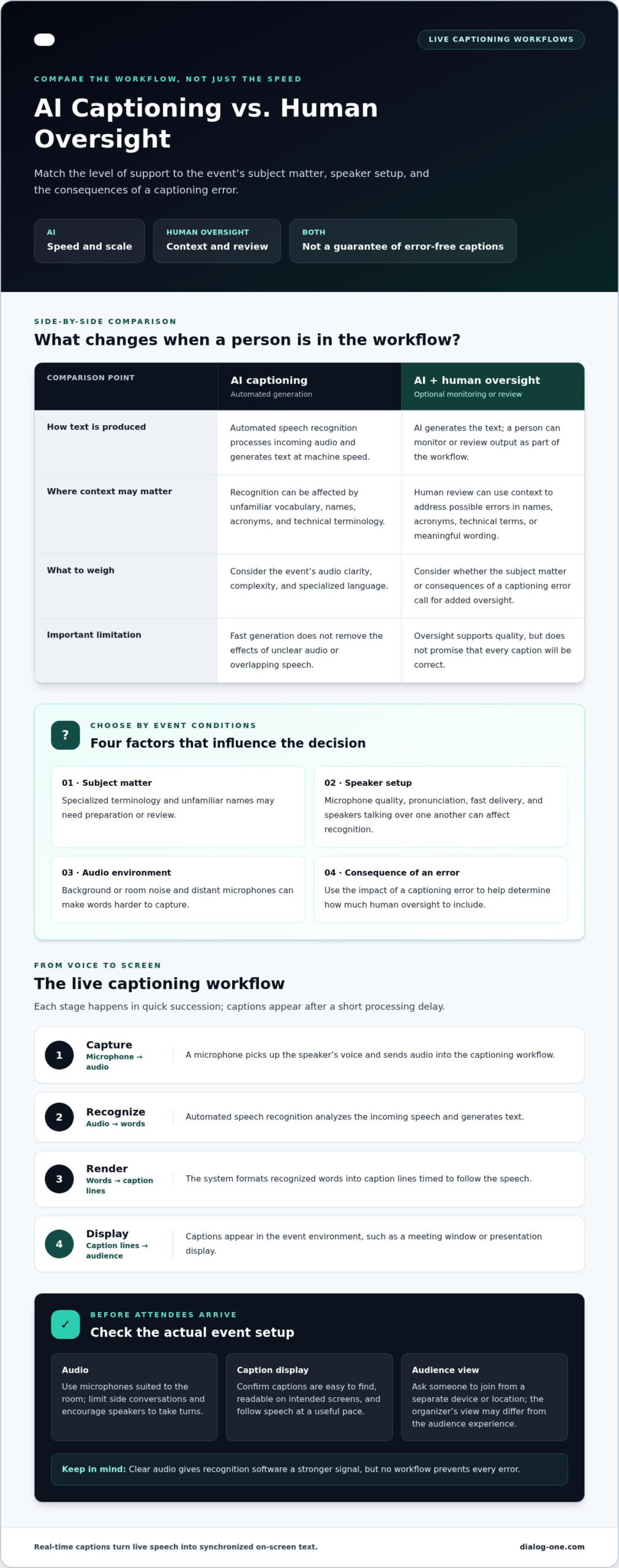
Caption quality depends on more than speech-recognition technology. Clear microphone audio gives the system a stronger signal, while overlapping speakers, room noise, and unclear pronunciation can make words harder to capture. Names, acronyms, and specialized terminology may also need preparation or review. Consider the event’s subject matter and the consequences of an error when deciding how much human oversight to include. This helps match the workflow to the event instead of assuming one method fits every setting.
How Real-Time Captioning Works: AI, Live Speech, and Human Review
A live captioning workflow connects a speaker’s audio to a text display, with several steps happening in quick succession. Understanding those steps helps event teams spot practical risks before they affect the audience. Automated speech recognition (ASR) processes incoming speech into text, but the quality of the captions depends on both the audio signal and how the session is managed.
The live captioning workflow from audio to screen
The path from a speaker’s voice to a participant’s screen typically follows this sequence:
- Capture: A microphone picks up the speaker’s voice and sends the audio into the captioning workflow.
- Recognize: ASR analyzes incoming speech and generates text. Background noise, distant microphones, accents, fast delivery, and unfamiliar vocabulary can affect recognition.
- Render: The system formats the recognized words into caption lines timed to follow the speech.
- Display: Captions appear in the event environment, such as a meeting window or presentation display, for participants to read.
Clear audio gives recognition software a stronger signal. Use microphones suited to the room, limit side conversations, and encourage speakers to take turns instead of talking over one another. These steps won’t prevent every error, but they can reduce avoidable barriers to comprehension.
Before attendees arrive, test the actual event audio setup. Confirm that captions appear where participants can find them, are readable on the intended screens, and follow speech at a useful pace. Ask someone to join from a separate device or location, since the organizer’s view may differ from the audience’s experience. Section 508 guidance also discusses caption and transcript practices, including synchronization and accuracy, in its guidelines for captions.
What human oversight can add to AI captioning
Automated generation converts audio into text at machine speed. Human oversight adds a person who can monitor or review the output and use context to address possible errors. Depending on the workflow, this support may help with speaker names, acronyms, technical terms, or wording whose meaning matters. It supports quality, but doesn’t promise that every caption will be correct.
For a routine internal discussion with clear audio, an automated workflow may meet the event’s needs. A session involving legal, healthcare, educational, or other consequential material may call for more review because a misstated term or statement could cause confusion. The appropriate level depends on the subject, audience, and impact of errors. Human review can help address context that speech recognition may miss, but teams should still prepare terminology and check the sound setup.
Dialog One combines AI live transcription and captioning with optional human oversight. If you’re assessing a workflow for a complex event, explore AI live transcription and captioning as one way to match technology and human expertise to your requirements.
AI Captioning or Human Oversight? Compare Workflows Before You Choose
There isn’t one captioning workflow for every event. Start with a practical question: if a caption misstates a phrase, what could happen? A missed word in a low-stakes update may be easy to clarify. A misheard name, instruction, or technical term in a consequential discussion may cause greater confusion. Match the level of review to that risk, along with the event’s audio, terminology, and audience needs.
| Workflow | Strengths | Constraints | Contexts to consider |
|---|---|---|---|
| Automated captioning | Processes speech into text quickly and can support live access without a person reviewing each caption. | Audio disruptions, overlapping speech, uncommon names, and specialist terms can affect what appears. | Meetings or presentations with clear audio, straightforward speech, and a priority on speed. |
| AI captioning with human oversight | Combines automated text generation with human attention to context, terminology, and potentially consequential wording. | Requires a workflow that includes a human review role; review supports quality but can’t guarantee error-free captions. | Events where complex content, multiple speakers, or the impact of a misheard phrase warrants added attention. |
When automated captioning may fit the event
Automated captioning may suit a straightforward meeting where speakers use clear audio, take turns, and discuss familiar material. It can also be a practical choice when captions need to keep pace with a live session and occasional recognition errors have limited consequences. Before choosing this approach, consider who will rely on the captions and whether the discussion includes names, acronyms, or technical vocabulary that may be difficult for speech recognition to interpret.
Preparation helps. Share terminology in advance where the workflow allows, encourage speakers to use microphones, and test the caption display. These steps improve the conditions for captioning, but they don’t establish a particular accuracy level or eliminate the possibility of errors.
When human review deserves greater consideration
Human oversight may deserve more attention when a session covers legal, healthcare, educational, or other professional material where specific wording carries weight. Several speakers, interruptions, and specialized terminology can also make context harder to interpret automatically. Consider whether an error could mislead a participant, change how an instruction is understood, or complicate later review. Let that potential consequence guide the workflow decision.
Dialog One combines AI live transcription and captioning with optional human oversight, bringing technology and human expertise into a considered approach without promising flawless output. Captions render spoken content as text; they don’t convey meaning between languages in the way spoken-language interpreters do. For broader context on AI’s evolving role, see AI Live Transcription Services: What Is Changing in 2026? Organizations evaluating a live workflow can also explore AI live captioning support in light of their event’s complexity and accountability needs.
Preparing for Real-Time Captioning at Meetings or Events
A short pre-event plan can prevent avoidable captioning problems and clarify who will respond if something changes. Use this checklist to match the setup to the event, audience, and consequences of a possible error.
- Define the format and audience. Identify whether the session is in person, remote, or hybrid. Consider how participants will view captions and whether they’ll join on phones, computers, or a shared display.
- Identify the access need. Captions display speech as text. If participants need spoken communication conveyed between languages, plan for spoken-language interpretation as a separate access need. Dialog One’s On-Demand Video Remote Interpreting: 2026 Guide covers that distinct workflow.
- Assess speakers and turn-taking. Count the expected speakers and note panels, audience questions, or discussion segments where people may talk over one another. Agree on a simple turn-taking approach before the session.
- Consider the impact of errors. Ask what could happen if a name, instruction, or specialist phrase is captioned incorrectly. Use that consequence to guide the level of review and preparation.
- Prepare terminology. Gather relevant names, acronyms, product or program terms, and technical vocabulary. Share them with the captioning workflow in advance where possible.
- Assign an event monitor. Decide who will check captions during the session and who can communicate an issue to the host, speaker, or technical team.
Prepare speakers, audio, and event terminology
Ask speakers to use a microphone, speak clearly, and pause between points instead of rushing through dense material. In a panel, the moderator can invite one person to speak at a time and repeat audience questions into a microphone. These habits improve audio conditions and make exchanges easier to follow.
Keep terminology preparation practical. A short list of names and field-specific words can help the team anticipate likely recognition challenges. Make sure the event monitor knows how to flag an unclear caption without interrupting the session unnecessarily.
Test caption access and plan for disruptions
Rehearse with the actual meeting or event setup, microphones, and display devices. Check that captions are visible, readable, and easy for participants to access. If possible, ask someone joining remotely to test the audience view, not just the organizer’s controls.
Agree on a response to common disruptions. If audio becomes unclear, pause and repeat the last point into the microphone, or switch to a backup audio source if one is part of the event plan. If connectivity changes, decide who will notify participants and coordinate a restart or other adjustment. Keep the response simple so the host can focus on the event.
Prepare your event workflow with Dialog One’s AI live captioning and transcription, with optional human oversight to align support with your requirements.
Real-Time Captioning with Dialog One: Match Support to Event Needs
Selecting a captioning workflow starts with the event, not a preset level of technology. A short internal briefing with clear audio may need a different approach from a public event or a discussion where specific wording carries professional consequences. Dialog One provides AI live transcription and captioning with optional human oversight, allowing organizations to weigh speed against the level of review their communication needs call for.
Before planning the service, identify the event format, who needs to access captions, how speakers will be heard, and whether the content includes specialized terms. Consider what an error could mean for participants. These details help shape an appropriate approach without assuming that every meeting or event requires the same workflow.
What Dialog One’s AI-and-human approach means in practice
AI supports the live conversion of speech into text. Optional human oversight adds expertise when context, terminology, or the consequences of a misheard statement warrant added attention. Neither technology nor review guarantees error-free captions. The goal is to make an informed choice about support and accountability.
That balance can matter in education, healthcare, and legal services, where communication may include specialized vocabulary or consequential information. Dialog One serves organizations and government agencies in these high-stakes sectors and brings more than 25 years of language-services experience. That experience informs an approach grounded in clarity, careful judgment, and respect for the people relying on the communication.
Move from requirements to a captioning plan
Prepare a concise event brief before choosing a workflow. Include the meeting or event format, audience access needs, audio setup, speaker count, relevant terminology, and the impact of a possible captioning error. Note the expected session length and whether it may change, and identify any review needs. These details also help clarify practical considerations for AI transcription fees: usage-based models generally tie charges to actual transcription use, while terms vary by service and configuration. Don’t assume a single billing structure applies to every event.
For a straightforward meeting, your brief may point toward an AI-focused workflow. If the event involves several speakers, technical discussion, or material where wording has greater consequences, consider whether optional human oversight is appropriate. Share the preferred level of support and event context when planning so the captioning approach can align with the session’s requirements.
Dialog One combines AI technology with human expertise to support captioning workflows across different organizational needs. If your team has defined its audience, event setup, terminology, and review expectations, describe the event and the workflow you’re considering, then explore Dialog One’s AI live captioning support.
Make Your Next Event Easier to Follow
Before your next session, turn your captioning decision into a clear plan: identify who needs access, what the discussion will cover, and how much human review the content calls for. This gives your team a practical starting point for choosing real-time captioning services that fit the event, rather than adding technology without a defined purpose.
Then align the event team around the essentials. Confirm the audio setup, prepare speakers for clear turn-taking, and decide who will respond if captions or connectivity become difficult to follow. A deliberate workflow makes audience access part of event planning instead of a last-minute adjustment.
Dialog One brings AI live transcription together with optional human oversight, informed by more than 25 years of language-services experience and work supporting education, healthcare, and legal services. If you’re planning a meeting or event, discuss real-time captioning for your next event and identify an approach suited to its communication needs. A thoughtful plan is a strong first step toward clearer participation.
Frequently Asked Questions
How accurate are real-time captioning services?
Accuracy varies with the audio, speakers, subject matter, and captioning workflow, so no single figure applies to every event. Identify the words that matter most, such as names, medication terms, or action items, and decide how they’ll be checked. For consequential discussions, optional human oversight can add context and review, but it doesn’t guarantee that every caption will be correct.
Can real-time captioning work for a virtual meeting?
Yes. Captions can be used in multilingual captioning virtual meetings when the audio and display workflow is set up for participants to access them. For example, test the caption view on both a phone and a computer, and confirm the meeting’s audio captures each speaker. Clarify who will report a caption or connection issue so the host can address it without derailing the discussion.
Do real-time captioning services work for in-person events?
Yes. Real-time captioning services can support in-person presentations, workshops, and panel discussions when speech is captured clearly and captions are visible to the audience. An attendee seated far from the stage, for example, may benefit from a text display even if they can hear the speaker. Plan where captions will appear and consider sightlines, room acoustics, and audience questions, which may need to be repeated into a microphone.
Can AI captions recognize names and technical terms?
AI may recognize familiar names and vocabulary, but uncommon names, acronyms, and field-specific terms can be transcribed incorrectly. Provide a concise reference list with spellings and, where useful, pronunciations before the session. For example, a team using an internal project acronym can explain what it stands for and how it’s spoken. Human oversight may help address terms whose exact wording is important to the audience.
Are real-time captions the same as translated subtitles?
No. Real-time captions display speech as text, usually in the language being spoken. Translated subtitles present dialogue in another language, which requires translating meaning rather than simply recognizing speech. A multilingual event may need both captioning and spoken-language interpretation, depending on how participants access information. Define the audience’s language needs separately from its need to read spoken content in real time.
How much do real-time captioning services cost?
Costs depend on the service and how it’s used. Dialog One’s AI transcription fees are usage-based, so the amount of live transcription is a relevant planning detail; human oversight may also affect the workflow and project scope. To develop a useful estimate, outline the event duration, format, and desired level of review. A generic market figure won’t serve as a quote for a specific event.
Can live captions replace an interpreter?
No. Live captions represent speech as text; an interpreter conveys meaning between languages. A caption can help someone read a speaker’s words, but it doesn’t provide spoken interpretation for a participant who needs communication in another language. For a multilingual appointment or meeting, consider interpretation as a separate access requirement. Some events may need both services to support different audience needs.