Live AI transcription is becoming more than a stream of captions. In 2026, AI live transcription services are moving toward real-time communication tools that can also translate speech, identify speakers, and generate summaries. That added capability raises a practical question: when can you rely on the words on screen, and when do they need human review?
It’s reasonable to expect quick, readable captions, but accuracy can falter when speakers overlap, audio is poor, or accents and specialized terms challenge the system. Captions, translated captions, and meeting summaries also serve different purposes. Treating them as interchangeable can create confusion.
This article explains how spoken audio becomes live text, what trends are shaping the technology, and how to set review and escalation practices that fit the stakes. It also covers privacy, accessibility, and accountability when conversations become searchable records. Dialog One combines AI live transcription and captioning with optional human oversight, bringing automated speed and professional language expertise together when context calls for added care.
Key Takeaways
- AI live transcription services convert speech into text in real time, but captions, saved transcripts, summaries, and translations serve different purposes.
- Follow the path from audio capture to speech recognition and displayed text to understand where errors can arise.
- Compare captions, speaker labels, searchable records, and summaries by the task you need them to support.
- Set clear expectations for audio quality, participant notice, human review, and how transcripts are accessed and retained.
- Dialog One combines usage-based AI transcription and captioning with optional human oversight when added accuracy support is needed.
What Are AI Live Transcription Services, and Why Are They Growing?
AI live transcription services automatically convert spoken language into text while speech is happening, making words visible during a conversation or available for reference afterward. Software analyzes audio and produces written output, helping people follow, document, and revisit spoken communication.
The category includes more than a single captioning feature. Live captions display speech as text during an event. A saved transcript preserves recognized speech for later review, though it may need correction before serving as a dependable record. A summary condenses key points, while translation renders speech or text in another language. These outputs can work together, but each serves a different purpose. A summary is not a complete record, and a transcript in the speaker’s language is not automatically a translation.
Remote meetings and online events can make spoken communication harder to follow or capture consistently. Live text can support participants who benefit from reading along, while a saved record can help teams review interviews, training sessions, or decisions without relying only on memory. Searchable text can also help locate a specific passage for follow-up. The field of Speech recognition covers the methods that enable computers to process spoken words, a foundation for turning live audio into text.
That shift changes the role of transcription. It is no longer only a way to document what was said after a conversation ends. In a live workflow, text can help people participate as the exchange unfolds, then support reference and review later. The value depends on matching the output to the task, rather than assuming one format will meet every need.
How is live transcription different from captions and meeting notes?
Captions are synchronized with speech so viewers can read along during a live session. A transcript preserves recognized speech as text for later reference, though it may need correction before serving as a dependable record. Meeting notes, summaries, and action items interpret the discussion. They can help people identify decisions or next steps, but they aren’t verbatim transcripts and may omit detail.
Who uses AI live transcription services?
Organizations use AI live transcription services for meetings, webinars, interviews, training, public events, and internal documentation. Captions can improve access for people who are deaf or hard of hearing, as well as participants joining in noisy settings, but captions alone may not meet every person’s communication needs. For sensitive or high-consequence discussions, plan appropriate review before relying on automated text.
How AI Live Transcription Works, from Speech Recognition to Usable Text
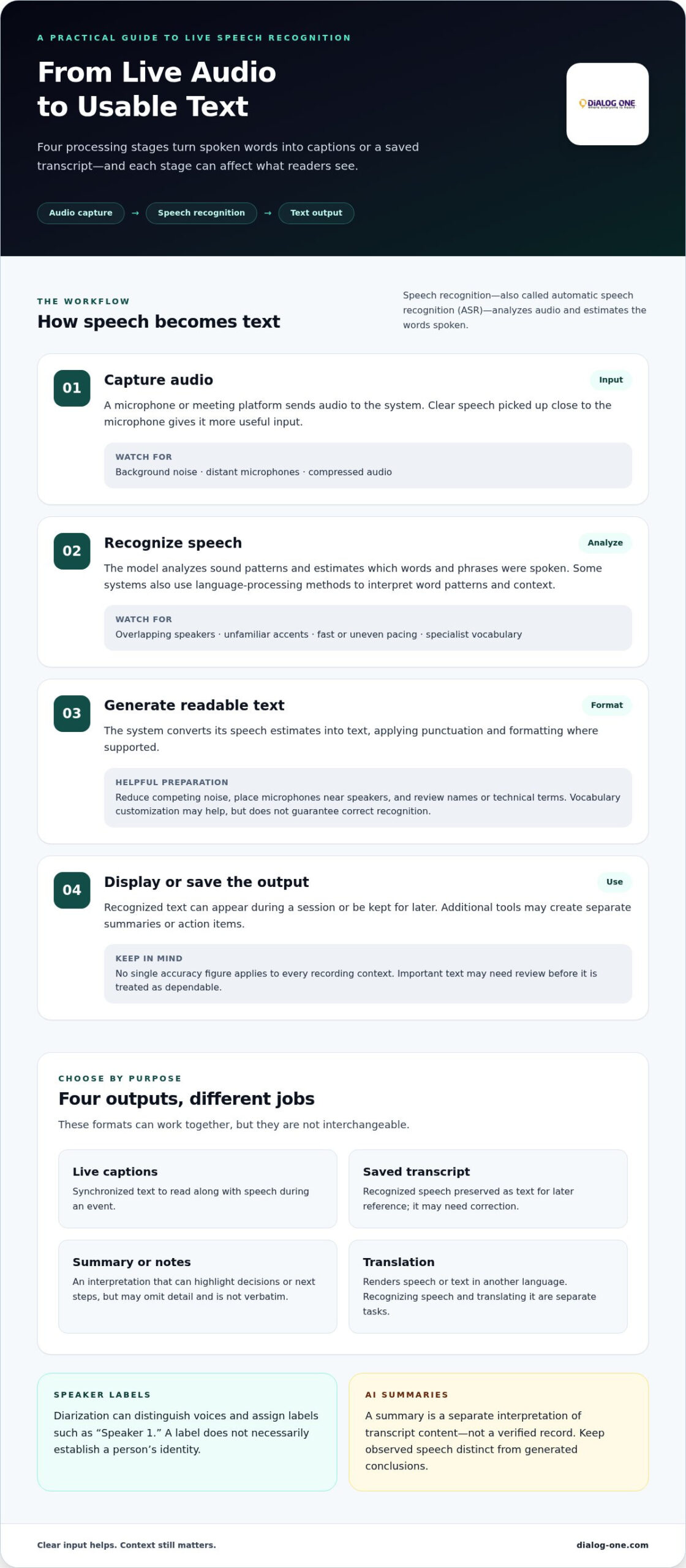
Live transcription begins with sound, but usable text depends on several processing steps. A microphone captures voices, software analyzes the audio, and a speech model predicts the words being spoken. The system then formats and delivers that text as captions or a transcript. Each step can affect what the reader ultimately sees.
In plain terms, speech recognition turns spoken words into written text. The technology is often called automatic speech recognition (ASR). Some systems also use language-processing methods to interpret word patterns and context. Natural Language Processing offers a broader explanation of how computers work with human language. Speech recognition identifies spoken words in the audio, while translation conveys their meaning in another language. The two tasks can be combined, but they aren’t the same.
A typical live workflow moves through these stages:
- Capture audio: A microphone or meeting platform sends audio to the transcription system. Clear speech picked up close to the microphone gives the system more useful input.
- Recognize speech: The model analyzes sound patterns and estimates which words and phrases were spoken.
- Generate text: The system converts those estimates into readable text, applying punctuation and formatting where supported.
- Display or save output: Text may appear as live captions or be kept as a transcript for later use. Additional tools may create separate summaries or action items.
Some systems can distinguish voices and adapt to subject-specific vocabulary. When a system supports vocabulary customization, providing relevant terms such as staff names or technical phrases can help. These features improve usability, but they don’t guarantee that every word or speaker will be identified correctly.
What affects real-time speech recognition?
Audio quality sets the foundation. Background noise, distant microphones, and compressed audio can obscure sounds before the model processes them. Overlapping speakers make it harder to separate phrases, while unfamiliar accents, fast or uneven pacing, and specialist vocabulary can lead to substitutions or omissions. For clearer results, reduce competing noise, place microphones near speakers, and review names or technical terms. No single accuracy figure applies to every recording context.
What do speaker labels and AI summaries add?
Speaker diarization identifies different voices in an audio stream and assigns labels such as “Speaker 1.” Those labels can clarify who spoke when, but they don’t necessarily establish a person’s identity. A summary is a separate interpretation of transcript content, not a verified record. Keep observed speech distinct from generated conclusions, and review important details before using them to document decisions or next steps.
When context matters, a review process can help address errors that automated processing may miss. Dialog One’s AI live transcription and captioning combines automated text with optional human oversight, providing added language expertise when appropriate.
AI Live Transcription Trends: Faster Output, More Context, and Clearer Limits
Live transcription is moving from a single stream of captions toward connected meeting and event workflows. People increasingly expect to follow speech as it happens, identify who said what, search a record later, and use summaries to find decisions or next steps. Familiar platforms such as Zoom and Microsoft Teams illustrate how transcription can sit alongside other meeting features, but each output still has a distinct purpose.
Faster text improves access to a conversation, but it doesn’t make that text verified communication. Less delay can help participants follow a discussion in real time, but it can’t ensure that unclear speech, technical terms, or speaker attribution have been interpreted correctly.
Raw captions: Text synchronized with speech for viewers during a live session. Useful for following along, but not necessarily edited or complete.
Speaker-labeled transcript: A written record that separates contributions by voice. Labels can aid review, but may not identify the actual people speaking.
Searchable record: A transcript that can be searched for a phrase or topic. Convenient for locating a passage, but searchability doesn’t verify its wording.
AI-generated summary: A condensed account of selected points, sometimes with suggested action items. It’s an aid for review, not a verbatim record or confirmed decision log.
Why are live transcription services becoming more contextual?
People want more than text appearing on screen. Speaker labels, search, summaries, and links to meeting materials can help turn a live session into a usable workflow. These additions can save time, but they also introduce interpretation. A generated action item might assign responsibility incorrectly or leave out a qualification. Review summaries against the discussion before treating them as agreed outcomes.
Connected features also make it important to distinguish outputs. A transcript records words as recognized by the system; a summary selects and interprets information from that text. Label the outputs separately so readers know whether they’re viewing speech or an AI-generated conclusion.
Where should AI transcription not be treated as the final authority?
In legal, medical, educational, and other consequential settings, an error can affect understanding or follow-up. A transcript may misrepresent meaning if speech is unclear, speakers overlap, or relevant context is missing. Use review safeguards that fit the situation, and escalate uncertain passages rather than assuming fluent text is accurate.
Language access also requires choosing the right support. Transcription writes spoken language as text; professional interpretation conveys spoken communication between languages. Multilingual captioning for virtual meetings can help participants follow speech in another language, but captions or translated text aren’t automatically a substitute for an interpreter. AI live transcription services are most useful when their limits are understood and the output is matched to the communication need.
How to Use AI Live Transcription Responsibly in Real Workflows
Good results depend on more than the transcription model. Before using AI live transcription services, decide what the text is for, who will rely on it, and what happens if it contains an error. A caption stream for general access has different review needs from a transcript used to document a consequential decision.
Use this checklist to establish a dependable workflow:
- Define the purpose. Decide whether you need live captions, a record for later reference, or another output. Don’t treat an automated summary as a substitute for the underlying speech.
- Prepare the audio. Position microphones close to speakers, reduce avoidable background noise, and limit overlapping conversation where practical.
- Give participants notice. Explain that speech is being transcribed and how the resulting text will be used. Consent and notice expectations depend on context and applicable rules.
- Plan review. Assign responsibility for checking important names, technical terms, decisions, and disputed statements. Make clear how corrections will be recorded.
- Set transcript controls. Establish who can access the transcript, who may share or edit it, and how long it should be retained. Align these choices with organizational policies and relevant privacy obligations.
These decisions matter because transcripts turn conversations into text that may be stored, shared, or revisited. Limit access to people who need it, and avoid retaining records by default without a clear purpose. Privacy, consent, access, and retention requirements can vary with the setting, the participants, and applicable rules. For healthcare-specific considerations around communication access and patient care, consult this healthcare language access services guide.
What should teams prepare before a live session?
Test microphone placement before the session and reduce nearby noise that could mask speech. If the transcription system supports vocabulary configuration, add relevant names, acronyms, or specialist terms in advance. Then identify who can view the output, review it, correct errors, and manage retention. A short pre-session check can prevent avoidable confusion later.
When should a person review or supplement AI output?
Escalate passages with unclear speech, overlapping voices, high-impact decisions, or disagreement about what was said. Human review is especially valuable when a name, technical phrase, or qualification could change the meaning. If participants need spoken communication across languages, transcription alone may not provide access; use a professional interpreter. Dialog One provides on-demand video remote interpreting for language access needs.
For organizations that need live text with an option for added human oversight, explore Dialog One’s AI live transcription and captioning. A defined review process keeps speed useful while preserving accountability.
How Dialog One Combines AI Live Transcription with Human Expertise
AI can turn live speech into readable text quickly, but speed alone can’t resolve every challenge. A speaker’s name may be unfamiliar, a technical phrase may have several meanings, or overlapping voices may make a statement unclear. For organizations, the important question is not simply how quickly text appears. It’s whether the level of review fits the audience and how the transcript will be used.
Dialog One provides usage-based AI live transcription and captioning, with optional human oversight. This approach pairs automated text generation with professional language expertise, giving organizations the option of added oversight when context or consequences call for closer attention. Dialog One brings more than 25 years of language-service experience to communication needs where clarity and responsible handling matter.
What does an AI-plus-human approach contribute?
Automation supports rapid output. Human expertise can bring attention to context, terminology, and the potential significance of what was said. The appropriate level of review depends on the session and intended use: a general event may have different needs from a discussion where a name, instruction, or decision must be captured carefully. Human oversight can support accuracy, but it doesn’t make a transcript automatically error-free or guarantee a particular outcome.
Organizations can make the process more purposeful by deciding in advance which content needs closer attention. For example, they may prioritize names, specialized vocabulary, key decisions, and passages participants dispute. That focus connects review effort to communication risks rather than treating every session identically.
- For live access: Consider whether participants need text as speech happens and how captions fit the event.
- For later reference: Define whether the transcript is a working aid, a record for review, or something else.
- For consequential content: Identify a review path for ambiguous wording, important terminology, or disputed statements.
- For language needs: Distinguish transcription from interpretation, which supports spoken communication between languages.
How can organizations take the next step?
Start by describing the workflow, not by assuming one tool or review level fits every situation. Consider who will speak, who needs to follow along, whether text is needed live or afterward, and how the transcript will inform decisions. These details help clarify whether AI captioning, optional human oversight, or another language support approach fits the communication need.
Dialog One combines AI technology with professional language expertise, serving organizations and public agencies with varied communication requirements. That experience can be relevant when a workflow involves specialized terminology, multiple audiences, or consequences that make clarity especially important. The aim is practical: use automation where it helps, and bring human attention to the points where context matters.
To discuss your organization’s live transcription or captioning workflow and intended audience, connect with Dialog One about AI live transcription.
Set a Clear Standard for Live Communication
Define what dependable communication looks like in your organization. Decide which sessions need captions, who will review important text, and how staff should handle a passage that remains unclear. These choices turn AI live transcription services from a convenient feature into a considered part of your communication practice.
That standard can evolve. Start with the needs of your audience and the consequences of getting a detail wrong, then adjust your review process as workflows change. Dialog One provides AI live transcription and captioning with optional human oversight for organizations and government agencies.
Explore how this approach could fit your organization’s needs: Explore Dialog One’s AI live transcription services. Clear expectations and the right level of support can help your teams communicate with greater confidence.
Frequently Asked Questions
Is AI live transcription accurate enough for important meetings?
AI live transcription services can help participants follow a meeting, but don’t treat an unreviewed transcript as the definitive account of a consequential discussion. For example, if a team is documenting an approval, have a responsible person compare the relevant passage with the meeting audio and confirm the wording with the appropriate participants. Mark unresolved sections as uncertain instead of turning a likely guess into an official record.
Can AI live transcription identify different speakers?
Some systems label separate voices, but a label such as “Speaker 2” may not tell you who that person is. For a meeting record, a reviewer can compare labeled turns with the agenda, introductions, and surrounding discussion, then note any uncertainty. Don’t infer identity from a voice label alone, especially if participants join late, interrupt one another, or speak through a shared microphone.
How does AI live transcription work?
A system processes captured audio with automatic speech recognition and produces text as the conversation unfolds. Some systems show partial wording before a phrase is complete, so live text may change as more speech arrives. For an important passage, wait for the output to settle before copying it into notes, then check the wording against the audio if available. Saved transcripts and generated summaries are separate outputs with different levels of detail.
What is the difference between live transcription and live translation?
Live transcription presents recognized speech as text, while live translation attempts to communicate that content in another language. Before a session, specify the language speakers will use and the language participants need to understand. Same-language captions may support someone reading along, while a multilingual appointment may call for interpretation that conveys meaning between participants. Choosing the right format helps avoid mistaking text access for language access.
Can AI live transcription be used in healthcare or legal settings?
It may support a workflow, but there isn’t one answer for every healthcare or legal use. The organization should define whether the transcript is a temporary aid, a draft for review, or part of an official record, then apply relevant privacy and professional policies. Assign responsibility for corrections and restrict access to those who need it. Don’t assume automated output meets a legal, regulatory, or clinical documentation requirement.
Does AI live transcription translate conversations automatically?
No, transcription alone doesn’t mean speech is being translated. Before a session begins, check the selected output and make sure it matches the audience’s need: same-language captions, text in another language, a saved transcript, or spoken interpretation. These outputs aren’t interchangeable. If participants need to communicate directly across languages, arrange an appropriate language-access workflow rather than assuming a transcript will bridge the conversation.
What should I do when a live AI transcript appears incorrect?
Mark the questionable passage and verify it before sharing or relying on it. If the audio is available, use it to check the words; if the meaning remains unclear, ask an appropriate participant or reviewer rather than silently guessing. Record corrections according to your organization’s process, especially for names, numbers, or disputed statements. For cross-language communication, use professional interpreting support when the message needs to be conveyed between participants.